Account Deletion Policy & Guide
At R Point, we respect your control over your data. If you decide to delete your account, this guide explains how the deletion process works, what data will be affected, and how you can restore your account within the 30-day grace period.
30-Day Grace Period
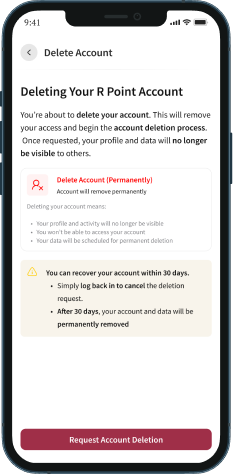
Once requested, your account enters a 30-day grace period. During this period, your account is scheduled for permanent deletion and can still be restored by logging back in.
Retain Application Access
During the 30-day grace period, you may continue to access your account and cancel the deletion request at any time before permanent deletion.
Recover Your Account
Changed your mind? You can cancel the deletion request at any time during the 30-day grace period by simply logging back into your account.
Complete Data Erasure
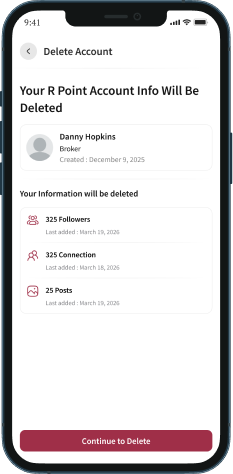
After 30 days, your account and associated personal data are permanently deleted from our systems, except where retention is required by applicable laws or regulatory obligations..
Starting Fresh
Once the 30-day grace period ends, your account data cannot be recovered. To use the R Point application again, you will need to register a new account.
Application Account Deletion Flow
Learn how to request account deletion step-by-step within the R Point mobile application.
Access Profile Dashboard
Open the R Point application and navigate to the Profile tab from the bottom navigation bar.
Open Settings Control
In your Profile screen, tap the Settings icon or select “Account Settings” to access account preferences.
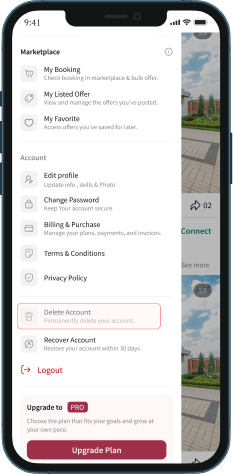
Select Delete Account
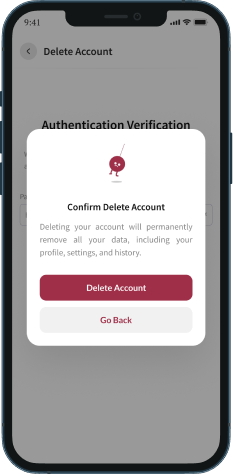
Scroll to the bottom of the account settings list and tap on the "Delete Account" button to proceed.
Confirm Deactivation Policy
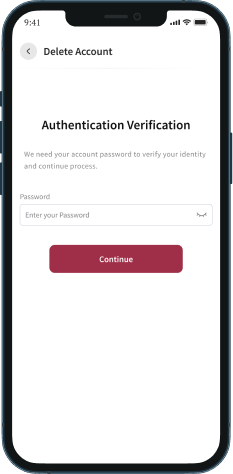
Read the 30-day grace period warnings carefully, select your reason for leaving, and confirm by tapping "Delete Account".
Scheduled for Deletion
Your account has been scheduled for deletion. A confirmation screen will display the grace period timeline and account recovery option.
Access Profile Dashboard
Open the R Point application and navigate to your Profile tab located in the bottom right corner of the navigation bar.